ประวัติการซื้อของลูกค้าในระบบร้านยา tPHARM
ระบบทีฟาร์ม (tPHARM) ได้ออกแบบมาให้เก็บประวัติการซื้อสินค้าของลูกค้าสำหรับร้านค้าที่มีการลงทะเบียน หรือบันทึกข้อมูลลูกค้าไว้ในระบบ (เพิ่มข้อมูลลูกค้าที่นี่) โดยข้อมูลเหล่านี้จะช่วยให้ร้านค้าสามารถวิเคราะห์พฤติกรรมการซื้อ ดูประวัติย้อนหลัง และใช้ จัดการร้านค้า และ บริหารสต็อกสินค้า ได้อย่างมีประสิทธิภาพใน ระบบร้านยา และ โปรแกรมร้านขายยา ของคุณ
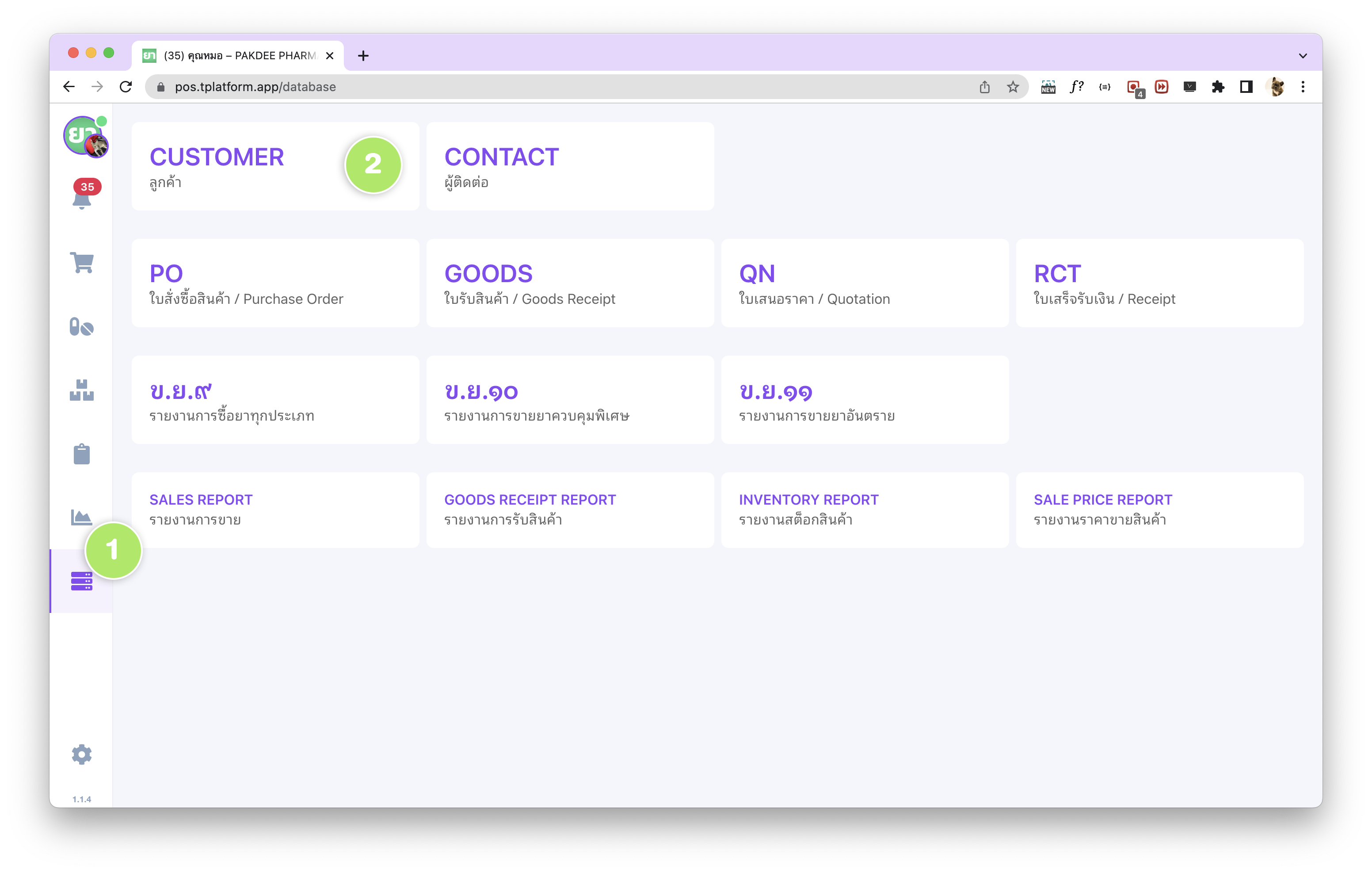
ร้านค้าสามารถเรียกดูประวัติการซื้อของลูกค้าได้ผ่านหน้าฐานข้อมูลลูกค้า ซึ่งอยู่ในแถบ (1) เมนูฐานข้อมูล ทางด้านซ้าย และ (2) Customer / ลูกค้า ภายในระบบ tPHARM ที่ทำงานแบบ online POS ช่วยให้ตรวจสอบข้อมูลได้จากทุกที่ที่มีอินเทอร์เน็ต
วิธีดูประวัติการซื้อของลูกค้าในระบบร้านยา
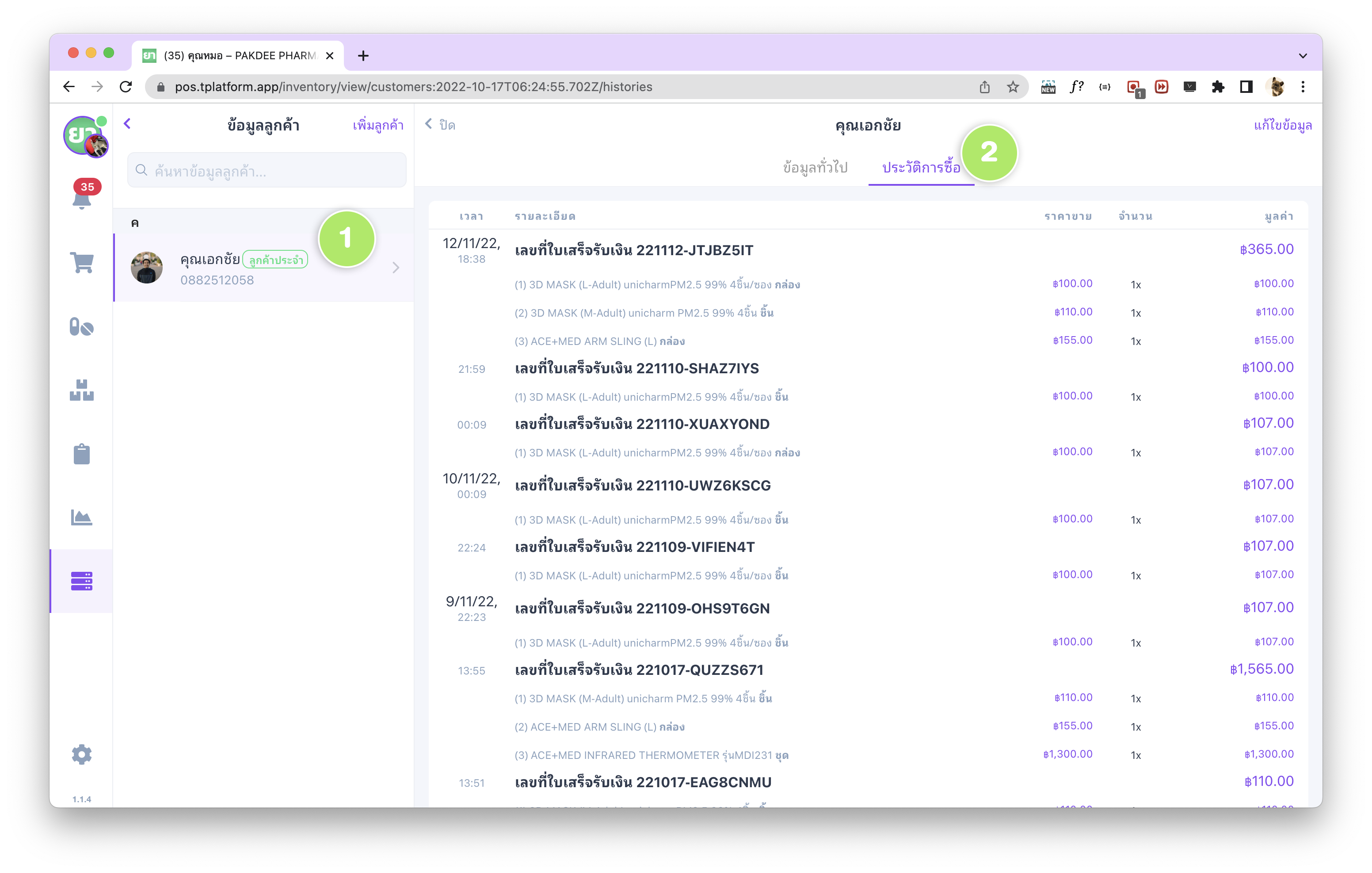
หลังจากเข้าหน้าฐานข้อมูลลูกค้าเรียบร้อยแล้ว ร้านค้าสามารถเลือก (1) รายชื่อลูกค้าที่ต้องการเรียกดูข้อมูล จากนั้นเลือกแถบ (2) “ประวัติการซื้อ” เพื่อดูประวัติการซื้อสินค้าทั้งหมดของลูกค้าคนนั้นผ่านระบบขายหน้าร้าน tPHARM POS
รายละเอียดประวัติการซื้อของลูกค้า
ในหน้าประวัติการซื้อของลูกค้า ระบบจะสรุปรายการซื้อแต่ละครั้ง เพื่อช่วยร้านขายยาในการ จัดการร้านค้า และให้บริการลูกค้าได้ดีขึ้น โดยรายละเอียดจะแสดงข้อมูลดังนี้
- เวลา – แสดงวันและเวลาที่มีการซื้อสินค้าในแต่ละครั้ง
- รายละเอียด – แสดงรายการสินค้าที่ซื้อ และรายละเอียดใบเสร็จรับเงินที่เกี่ยวข้อง
- ราคาขาย – แสดงราคาขายต่อหน่วยของสินค้าที่ลูกค้าเคยซื้อ ช่วยตรวจสอบความถูกต้องย้อนหลังได้
- จำนวน – แสดงจำนวนสินค้าที่ลูกค้าซื้อในแต่ละรายการ
- มูลค่า – แสดงมูลค่าสุทธิของสินค้าที่ซื้อ (ราคาขาย × จำนวน)
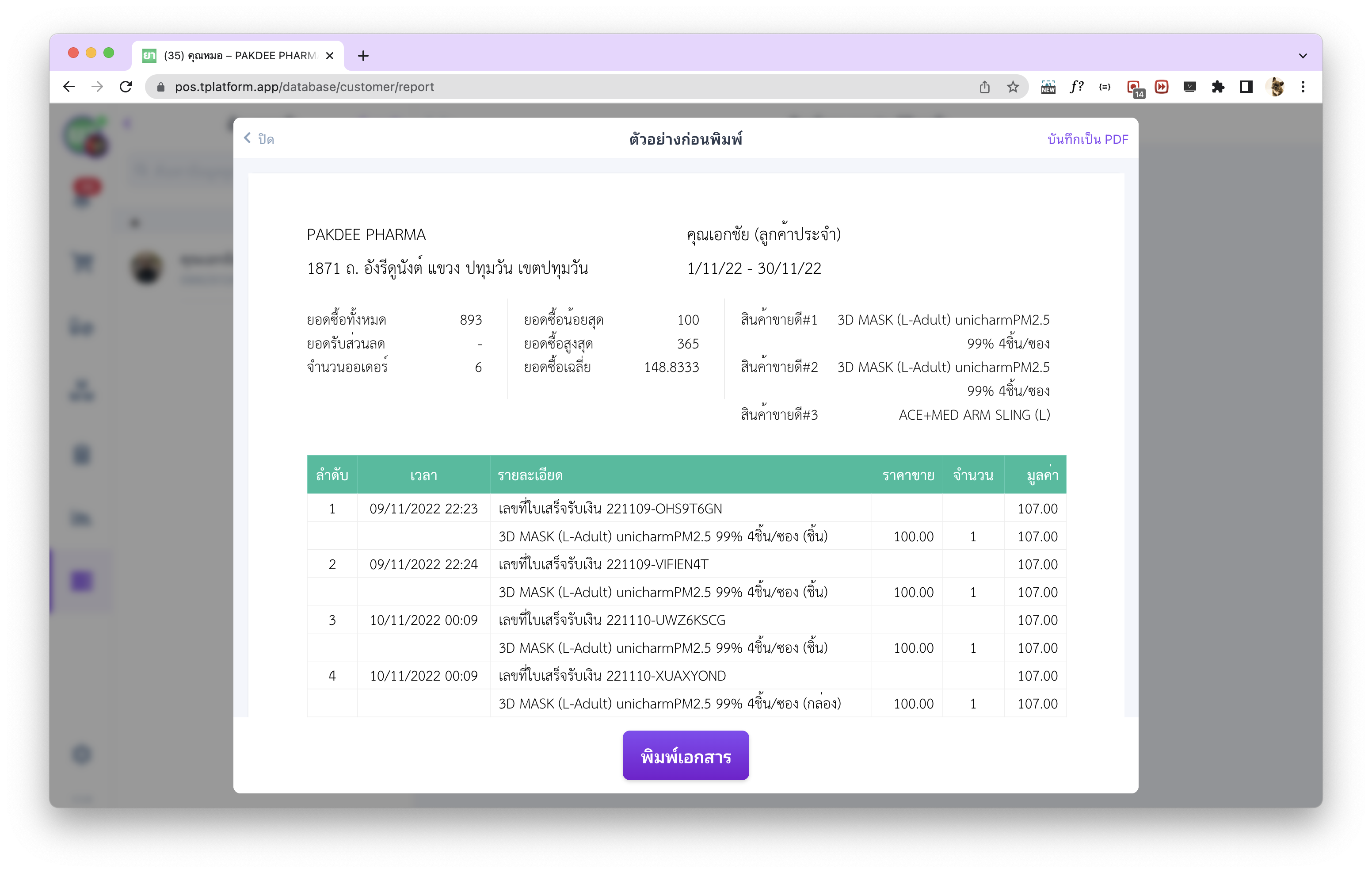
พิมพ์รายงานประวัติลูกค้า (Customer Report) สำหรับ Standard Package
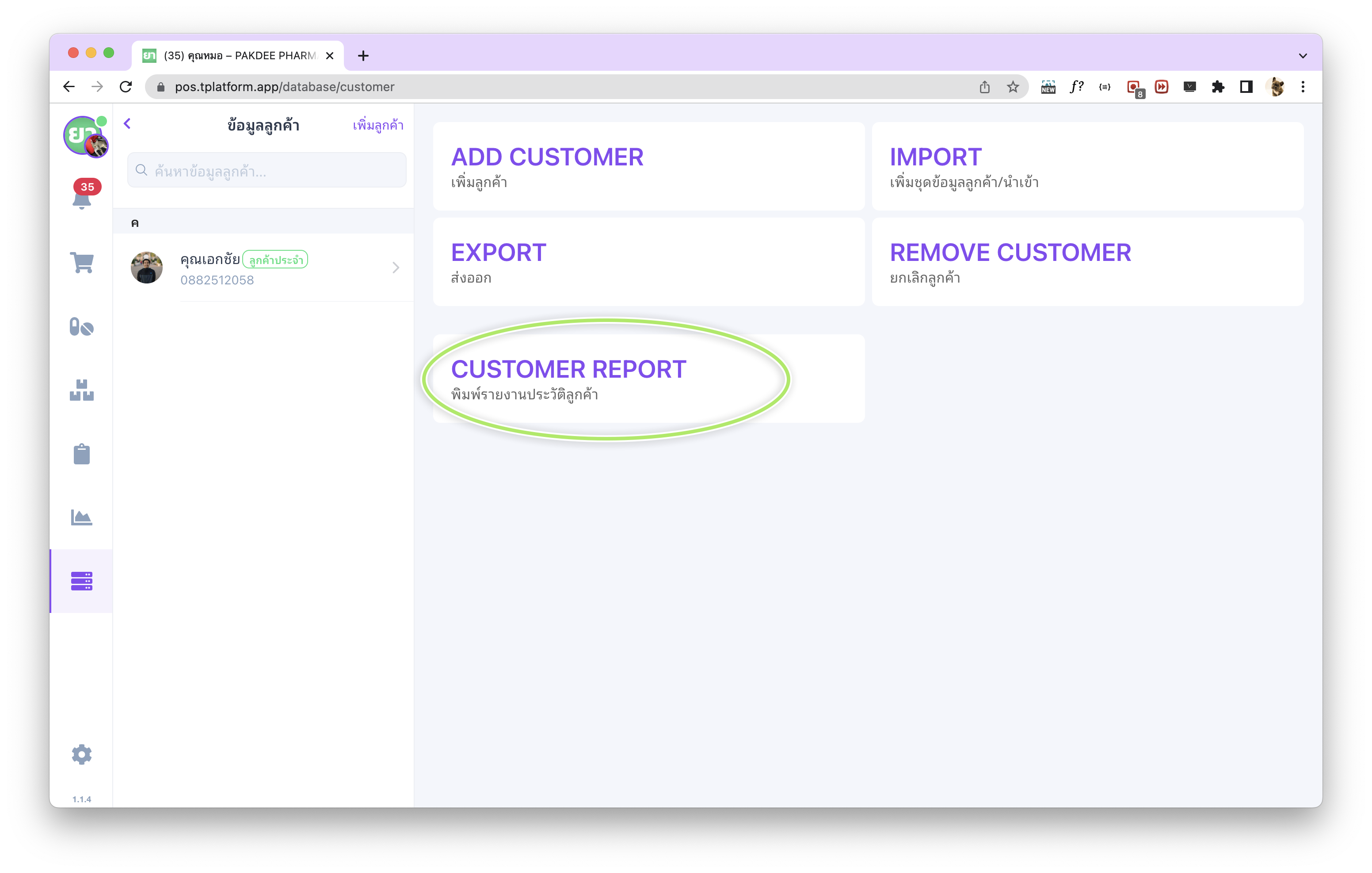
สำหรับร้านค้าที่ใช้งาน Standard แพ็กเกจ ในระบบ tPHARM ซึ่งเหมาะกับการ จัดการร้านค้า และการวิเคราะห์ลูกค้าเชิงลึก ระบบจะมีฟังก์ชัน “Customer Report / พิมพ์รายงานประวัติลูกค้า” เพื่อสร้างรายงานประวัติการซื้อของลูกค้าในรูปแบบไฟล์ PDF
ร้านค้าสามารถใช้งานได้จากหน้าฐานข้อมูลลูกค้า โดยเลือกหัวข้อ “Customer Report / พิมพ์รายงานประวัติลูกค้า” จากเมนูฐานข้อมูล ซึ่งรองรับการเลือกช่วงวันที่ และเลือกลูกค้าได้พร้อมกันหลายราย เหมาะกับการใช้เพื่อวิเคราะห์ยอดขายต่อรายลูกค้า วางแผนโปรโมชั่น หรือใช้ร่วมกับงานบัญชีและการ บริหารสต็อกสินค้า
Customer Purchase History in the tPHARM Pharmacy POS (online POS)
The tPHARM pharmacy POS system (โปรแกรมร้านขายยา) is designed to record and store detailed purchase history for every customer who has been registered in the system (add customer information here). This allows pharmacy owners to review purchase history, understand buying behavior, and better manage the store (จัดการร้านค้า) and control inventory (บริหารสต็อกสินค้า) within a modern online POS–style ระบบร้านยา.
You can access customer purchase history from the Customer Database screen, located under (1) the Database menu on the left sidebar and (2) the “Customer” section. All of this is available directly inside the tPHARM system, which works as an online POS and can be used from multiple locations.
How to View Customer Purchase History
Once you are on the Customer Database screen, select (1) the customer whose history you want to review, then click the (2) “Purchase History” tab to see all past purchases for that customer made through the tPHARM POS system.
Details Shown in Customer Purchase History
The purchase history view is designed to help you run your pharmacy store management more efficiently and provide better after-sales service. For each purchase record, the system shows:
- Date & Time – When the transaction took place.
- Details – The list of items purchased and related receipt information.
- Selling Price – The price at which the item was sold to that customer, useful for checking previous prices or resolving disputes.
- Quantity – The number of units purchased in that transaction.
- Amount – The net value of the purchased items (selling price × quantity).
Customer History Reports (Customer Report) – Standard Package
For pharmacies using the Standard package of tPHARM – ideal for professional store management and deeper customer analytics – the system provides a “Customer Report / พิมพ์รายงานประวัติลูกค้า” feature. This lets you generate PDF reports that summarize customer purchase history over a selected period.
From the Customer Database screen, you can open the Customer Report tool, select multiple customers at once, and define a date range. This is useful for analyzing sales per customer, planning loyalty programs, or combining with accounting and inventory management (บริหารสต็อกสินค้า). It fits perfectly into a flexible online POS workflow and offers capabilities beyond many basic pos free tools while still being focused specifically on pharmacies (ระบบร้านยา และ โปรแกรมร้านขายยา).