บันทึกข้อมูลลูกค้าในระบบร้านยา tPHARM เพื่อดูแลลูกค้าได้อย่างเป็นกันเอง
หากเรามีลูกค้าประจำที่แวะมาซื้อสินค้าบ่อย ๆ การทักทาย พูดคุย สอบถามสารทุกข์สุกดิบกันเล็กน้อย เป็นสิ่งที่ช่วยเติมสีสันให้การทำงานในแต่ละวันได้อย่างดี และจะดียิ่งขึ้นไปอีกหากเรามีการจดบันทึกข้อมูลเล็ก ๆ น้อย ๆ ของลูกค้าที่น่ารัก ไม่ว่าจะเป็นเบอร์โทรศัพท์ ที่อยู่ / ที่พักอาศัย หรือประวัติการซื้อสินค้า ข้อมูลเหล่านี้ไม่เพียงแต่มีประโยชน์ต่อการให้บริการเท่านั้น แต่ยังช่วยเพิ่ม อรรถรสของบทสนทนา ทำให้เราพูดคุยกับลูกค้าได้อย่างจริงใจและใกล้ชิดมากขึ้น
เมื่อเก็บประวัติการสั่งซื้อสินค้าและข้อมูลประกอบอื่น ๆ ไว้อย่างเป็นระบบ ความสัมพันธ์ระหว่างร้านกับลูกค้าก็มีโอกาสแน่นแฟ้นมากขึ้น เหมาะกับร้านขายยาที่ต้องการ ระบบร้านยา หรือ online pos เพื่อช่วย จัดการร้านค้า และรองรับการเติบโตในระยะยาว
ข้อมูลลูกค้าที่ระบบสามัญประจำร้านยา tPHARM รองรับ
ระบบสามัญประจำร้านยา tPHARM มาพร้อมฟังก์ชันบันทึกข้อมูลลูกค้าที่ละเอียด เหมาะกับร้านที่ต้องการใช้ โปรแกรมร้านขายยา หรือ pos free ที่ช่วยทั้งงานบริการและการ บริหารสต็อกสินค้า โดยสามารถเก็บข้อมูลได้ทั้ง:
- รูปภาพลูกค้า
- ประเภทลูกค้า
- ชื่อ–นามสกุล
- โทรศัพท์
- อีเมล
- ที่อยู่ปัจจุบัน
- โรคประจำตัว
- ข้อมูลการแพ้ยา
- ประวัติการสั่งซื้อสินค้า เป็นต้น
ประเภทลูกค้าในระบบ tPHARM และการเชื่อมกับราคาขาย
อีกหนึ่งฟังก์ชันสำคัญของทีฟาร์มคือหัวข้อ (2) ประเภทลูกค้า ซึ่งสามารถนำไปผูกกับราคาขายของสินค้าแต่ละรายการ เพื่อสร้างโปรโมชั่นหรือราคาพิเศษให้กับลูกค้าแต่ละกลุ่มได้อย่างยืดหยุ่น เหมาะสำหรับร้านที่ต้องการวางกลยุทธ์การขายผ่าน online pos และ โปรแกรมร้านขายยา โดยประเภทลูกค้าที่ระบบมีให้สามารถแบ่งได้ดังนี้
- ลูกค้าทั่วไป
- ลูกค้าประจำ
- ลูกค้าขายส่ง
- เพื่อนสนิท
- Shopee (ช้อปปี้)
- Lazada (ลาซาด้า)
- Food Panda
- Grab
- LINE MAN
วิธีการเพิ่มข้อมูลลูกค้าในระบบ tPHARM
วิธีการเพิ่มข้อมูลลูกค้าผ่านระบบ tPHARM สามารถทำได้ 2 ช่องทางหลัก ๆ ดังนี้
-
หน้าการขาย หรือ POS / Point of Sale
ในหน้าขายสินค้าผ่านระบบ online pos ของทีฟาร์ม แถบข้อมูลลูกค้าจะอยู่ด้านขวาบนของหน้าจอ ร้านค้าสามารถคลิกเลือก “ข้อมูลลูกค้า” เพื่อเลือกลูกค้าที่มีอยู่ในระบบ หรือบันทึกข้อมูลลูกค้าใหม่ได้ทันที
(Tip: หากอยู่ในหน้าการขาย สามารถกดปุ่ม F2 เพื่อเปิดแถบรายการลูกค้าอย่างรวดเร็ว)
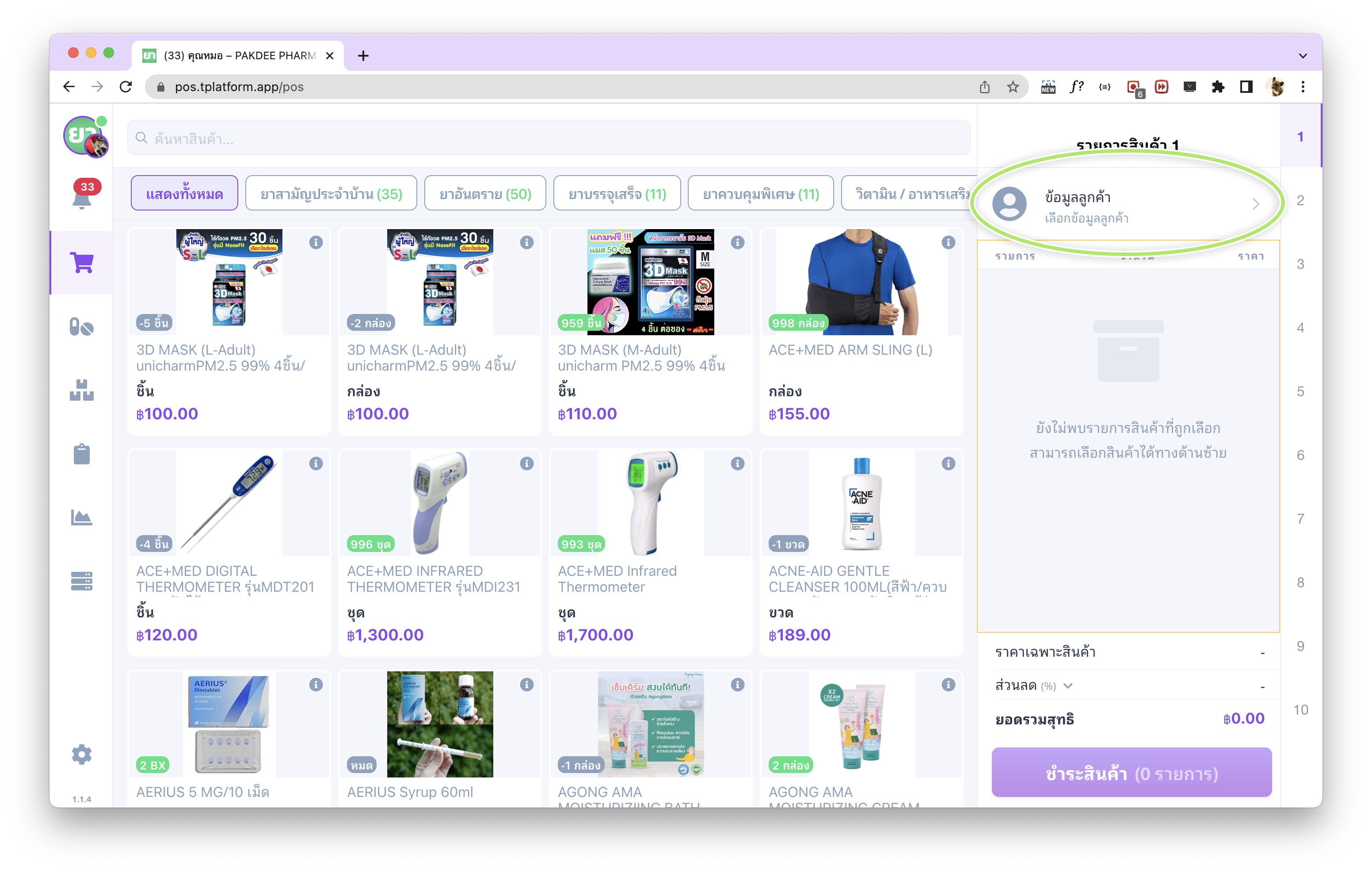
หลังจากเลือกแถบ “ข้อมูลลูกค้า” ระบบจะแสดง (1) แถบรายชื่อลูกค้า ซึ่งร้านค้าสามารถค้นหาลูกค้าจากชื่อหรือเบอร์โทรศัพท์ได้ หากต้องการเพิ่มลูกค้าใหม่ สามารถกดปุ่ม (2) “เพิ่มลูกค้า” ที่มุมขวาบนได้ทันที
หมายเหตุ: ในหน้าการขาย (POS) ไม่สามารถแก้ไขข้อมูลลูกค้าที่มีอยู่แล้ว หากต้องการแก้ไขข้อมูล ให้ไปดำเนินการที่หน้าฐานข้อมูลลูกค้า
-
หน้าฐานข้อมูลลูกค้า
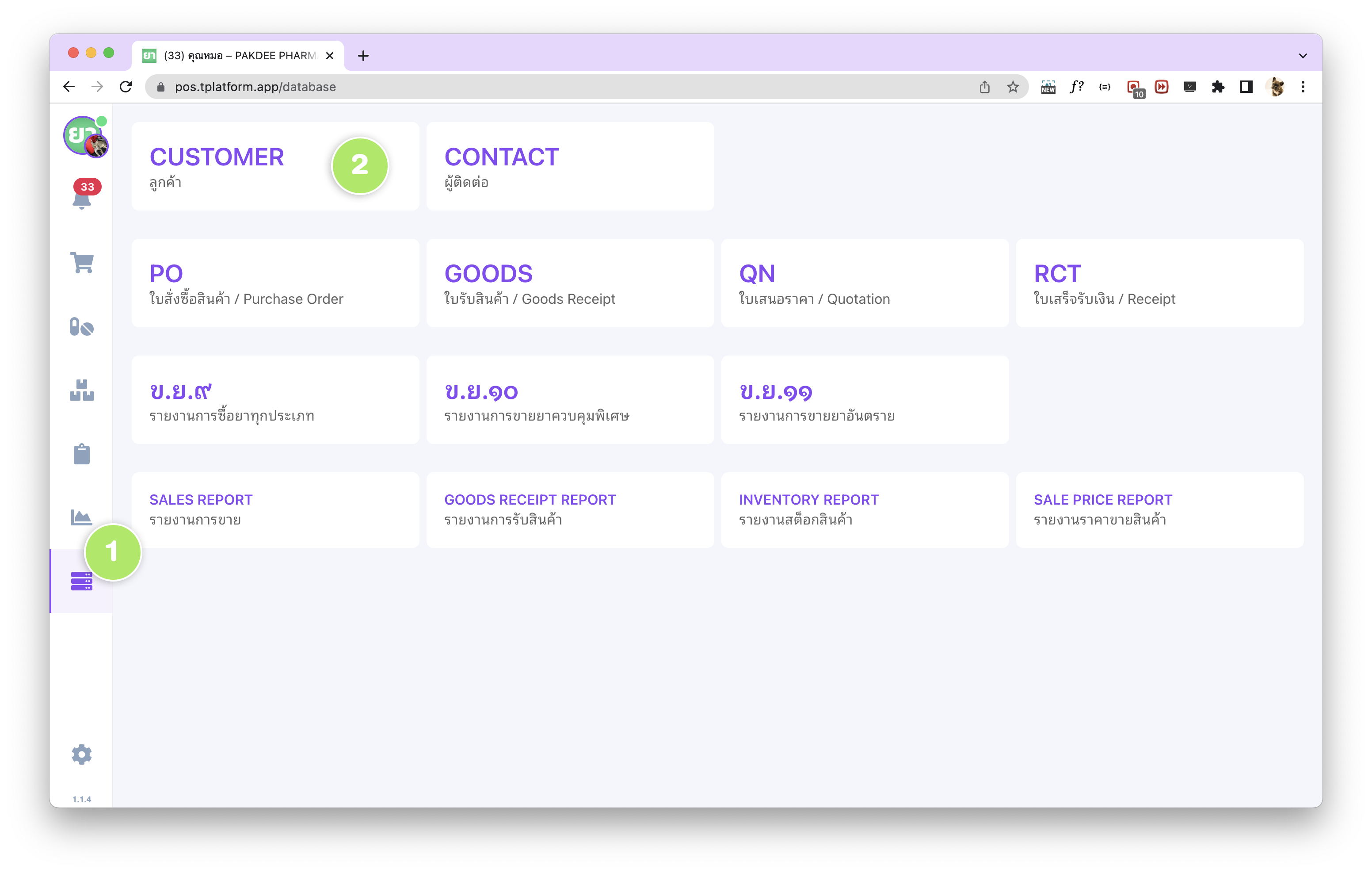
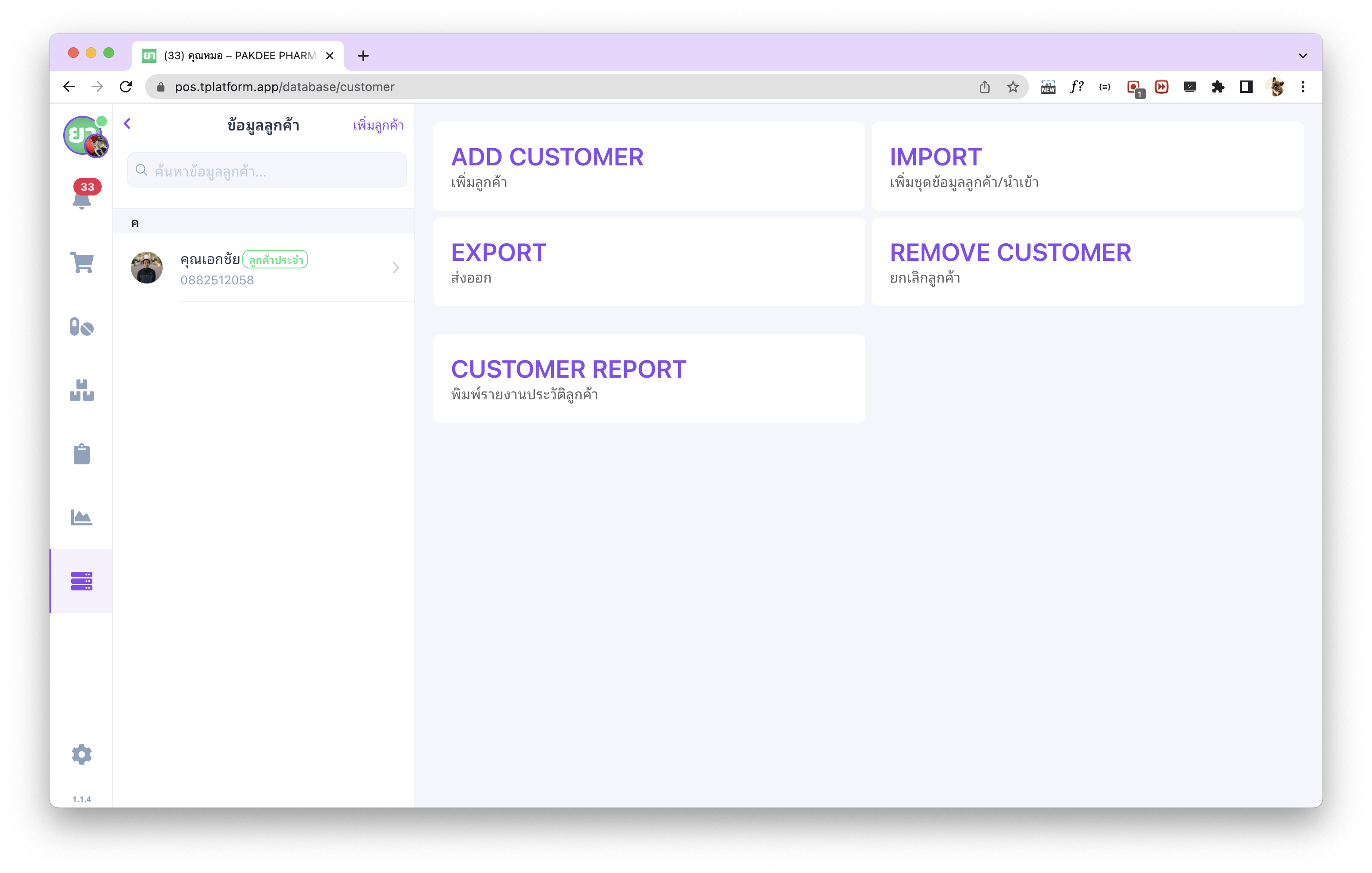
หน้าฐานข้อมูลลูกค้าเป็นที่เก็บข้อมูลลูกค้าทั้งหมดของร้านไว้ในที่เดียว สามารถเข้าใช้งานได้โดยไปที่ (1) เมนู ฐานข้อมูล และเลือก (2) Customer / ลูกค้า
ฟังก์ชันในหน้าฐานข้อมูลลูกค้าของ tPHARM
สำหรับหน้าฐานข้อมูลลูกค้าจะมีรายละเอียดและฟังก์ชันหลัก ๆ ดังนี้
- เพิ่มข้อมูลลูกค้า – ใช้บันทึกรายชื่อลูกค้าใหม่ทีละราย
- เพิ่มชุดข้อมูลลูกค้า / นำเข้า – เหมาะสำหรับร้านค้าที่ต้องการเพิ่มรายชื่อลูกค้าจำนวนมากพร้อมกันจากไฟล์ข้อมูล
- ส่งออก – สามารถส่งออกข้อมูลลูกค้าในรูปแบบ Excel / Data Sheet เพื่อใช้วิเคราะห์หรือสำรองข้อมูลเพิ่มเติม
- ยกเลิกลูกค้า – ใช้สำหรับปิดการใช้งานลูกค้าที่ไม่ต้องการใช้งานแล้ว
- พิมพ์รายงานประวัติลูกค้า – เรียกดูประวัติการซื้อสินค้าของลูกค้าในรูปแบบไฟล์ PDF (สำหรับ Standard Package)
Customer Profile Management in tPHARM (English Version)
When you have loyal customers who visit your pharmacy frequently, a simple warm greeting can already brighten your day. It becomes even more meaningful when you remember small details about them – such as their phone number, address, or purchase history. Recording this information helps you build truly personal conversations, strengthen long-term relationships, and provide safer care, especially for medication-related services.
With tPHARM, an online POS and pharmacy management system, you can manage customer information in a structured way that supports both daily operations and long-term store management.
Customer Data Fields Supported by tPHARM
tPHARM’s customer module is designed for pharmacies and health-focused stores that need more than just a basic POS. It behaves like a program for pharmacy stores or a flexible pos free-style solution, allowing you to store the following customer data:
- Customer photo
- Customer type / group
- Full name
- Phone number
- Current address
- Underlying diseases
- Drug allergy information
- Order and purchase history
Customer Types and Pricing Rules
One of the key features in tPHARM is the Customer Type field, which can be linked directly to different selling prices. This allows you to create targeted promotions and special pricing schemes per customer group, fully integrated with the POS. tPHARM supports multiple customer types, including:
- General Customer
- Regular Customer
- Wholesale Customer
- Close Friend
- Shopee
- Lazada
- Food Panda
- Grab
- LINE MAN
Two Ways to Add Customer Data in tPHARM
You can add or manage customer information in tPHARM via two main entry points:
-
From the POS (Point of Sale) Screen
On the sales screen of the online POS, the customer panel is located at the top-right area. Click “Customer Info” to select an existing customer or add a new one.
Tip: On the POS page, press F2 to quickly open the customer list.
After opening the “Customer Info” panel, tPHARM shows a searchable list of customers where you can search by name or phone number. To add a new customer, click the “Add Customer” button in the top-right corner.
Note: On the POS screen, existing customer records cannot be edited. To modify customer details, use the Customer Database page instead.
-
From the Customer Database Page
The Customer Database page is where all customer records are stored and managed. Go to (1) the Database menu, then select (2) Customer.
Main Functions in the Customer Database
The Customer Database page in tPHARM includes the following key functions to support daily operations and long-term store management:
- Add Customer – Create individual customer profiles.
- Bulk Import Customers – Import multiple customers at once from a file when migrating from another system.
- Export – Export customer data in Excel / Data Sheet format for backup or analytics.
- Deactivate Customer – Deactivate customers that are no longer active.
- Print Customer History Report – Generate a PDF report of a customer’s purchase history (available in the Standard Package).