เรียกดูยอดขายแบบเรียลไทม์ ผ่านเว็บไซต์ tPHARM (รองรับมือถือเต็มรูปแบบ)
ในกรณีที่ร้านค้ามีพนักงานขายหน้าร้าน หรือเจ้าของร้านไม่สามารถเฝ้าหน้าร้านได้ตลอดเวลา ระบบทีฟาร์มได้พัฒนาฟีเจอร์รายงานออนไลน์ ที่ช่วยให้เจ้าของร้านสามารถเช็กยอดขายแบบเรียลไทม์ได้ทุกที่ทุกเวลา ไม่ว่าจะอยู่ที่บ้าน หรือกำลังนั่งจิบกาแฟชิล ๆ ริมทะเลก็สามารถตรวจสอบกิจการได้ทันที
เพียงเข้าเว็บไซต์ https://stats.tpharm.app และระบุ (1) อีเมลที่ใช้ล็อกอินระบบ tPHARM POS และ (2) รหัสผ่าน
โดยเว็บไซต์นี้ จะไม่บันทึกข้อมูลล็อกอิน — หากเปิดใช้งาน 10 ครั้ง ก็ต้องกรอกอีเมลและรหัสผ่านใหม่ทั้ง 10 ครั้ง เพื่อความปลอดภัยสูงสุด
สรุปภาพรวมวันนี้ (Today Overview)
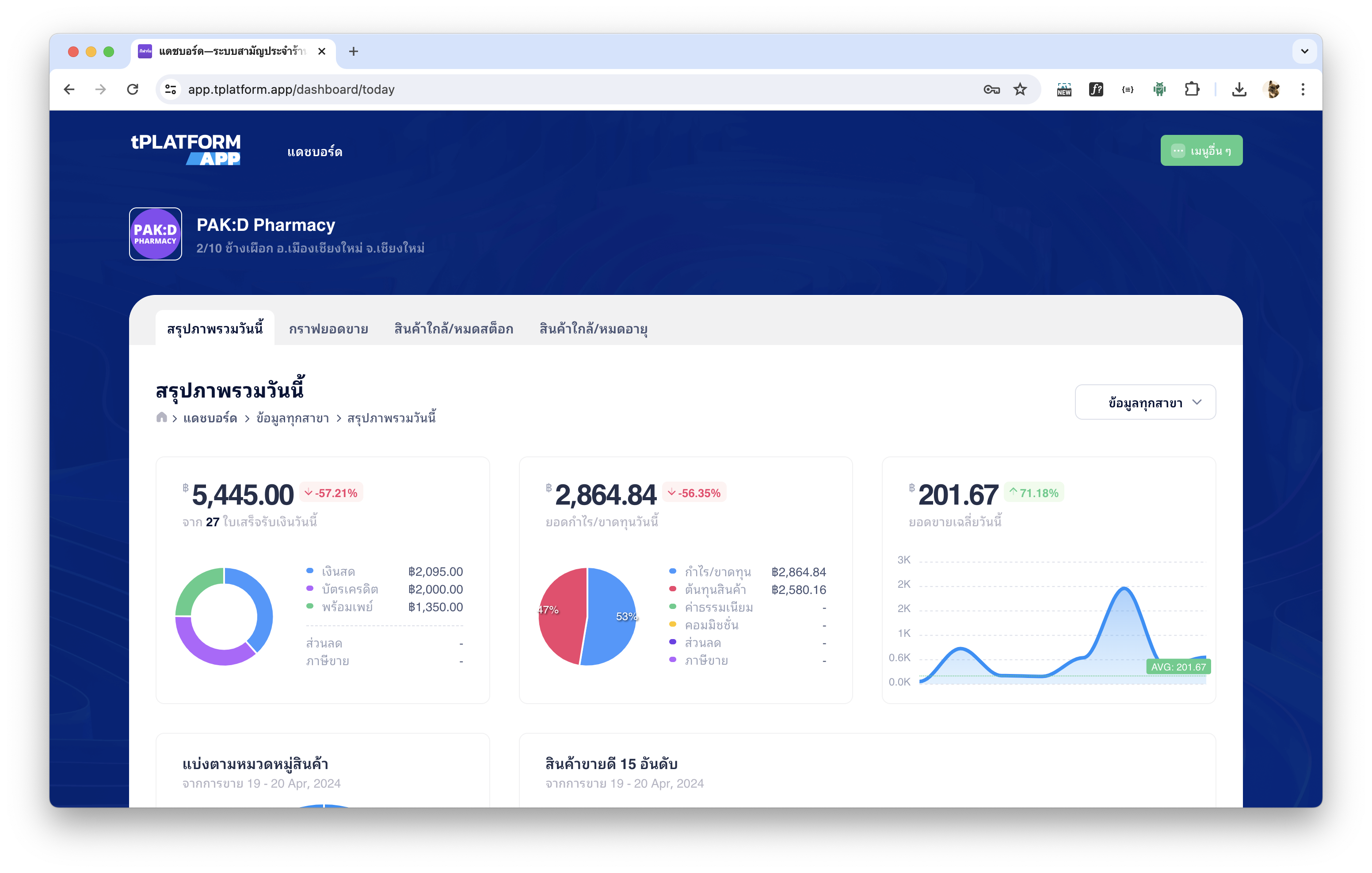
สรุปภาพรวมวันนี้
- แสดงใบเสร็จรับเงินพร้อมยอดขายของวันนี้ พร้อมแยกช่องทางการชำระเงิน (เงินสด, บัตรเครดิต, พร้อมเพย์)
- ยอดกำไร / ขาดทุน ของวันนี้
- กราฟยอดขายเฉลี่ยของวันนี้ (ตั้งแต่ 00:00–23:59 น.)
- ยอดขายแยกตามหมวดหมู่ พร้อมแสดงหมวดหมู่ขายดีประจำวัน
- สินค้าขายดี 15 อันดับแรกของวันนี้ (อิงตามจำนวนชิ้น/หน่วยนับ)
- รายการขายล่าสุดของวันนี้ (Real-time Updates)
กราฟยอดขาย (Sales Chart)
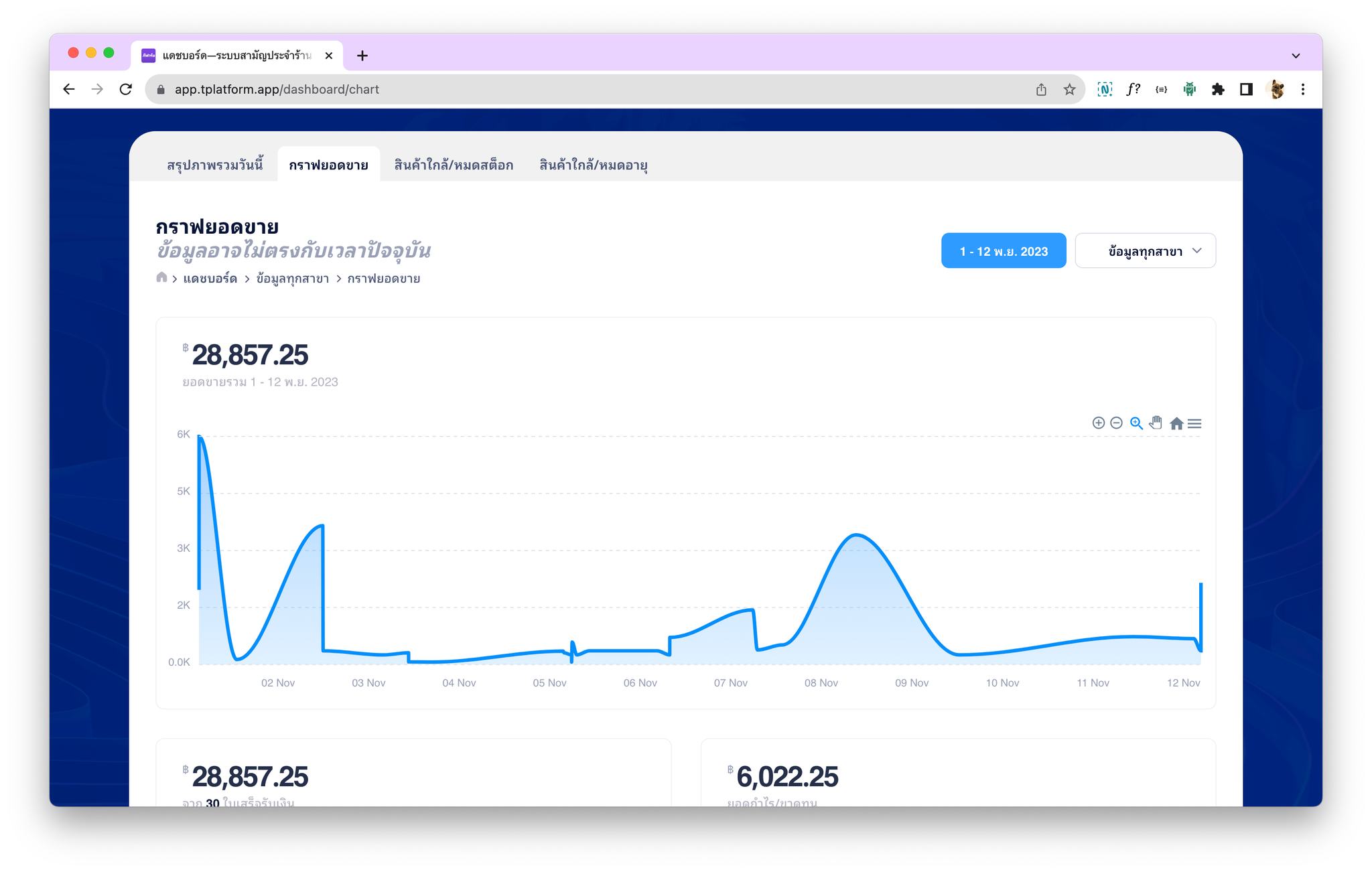
กราฟยอดขาย
ร้านค้าสามารถเลือกวันที่ต้องการดูยอดขายย้อนหลังได้ แต่ระบบกำหนดให้เลือกได้สูงสุดไม่เกิน 31 วัน (1 เดือน) เพื่อความรวดเร็วและประสิทธิภาพในการประมวลผลข้อมูล
สินค้าใกล้หมด / หมดสต๊อก (Low Stock)
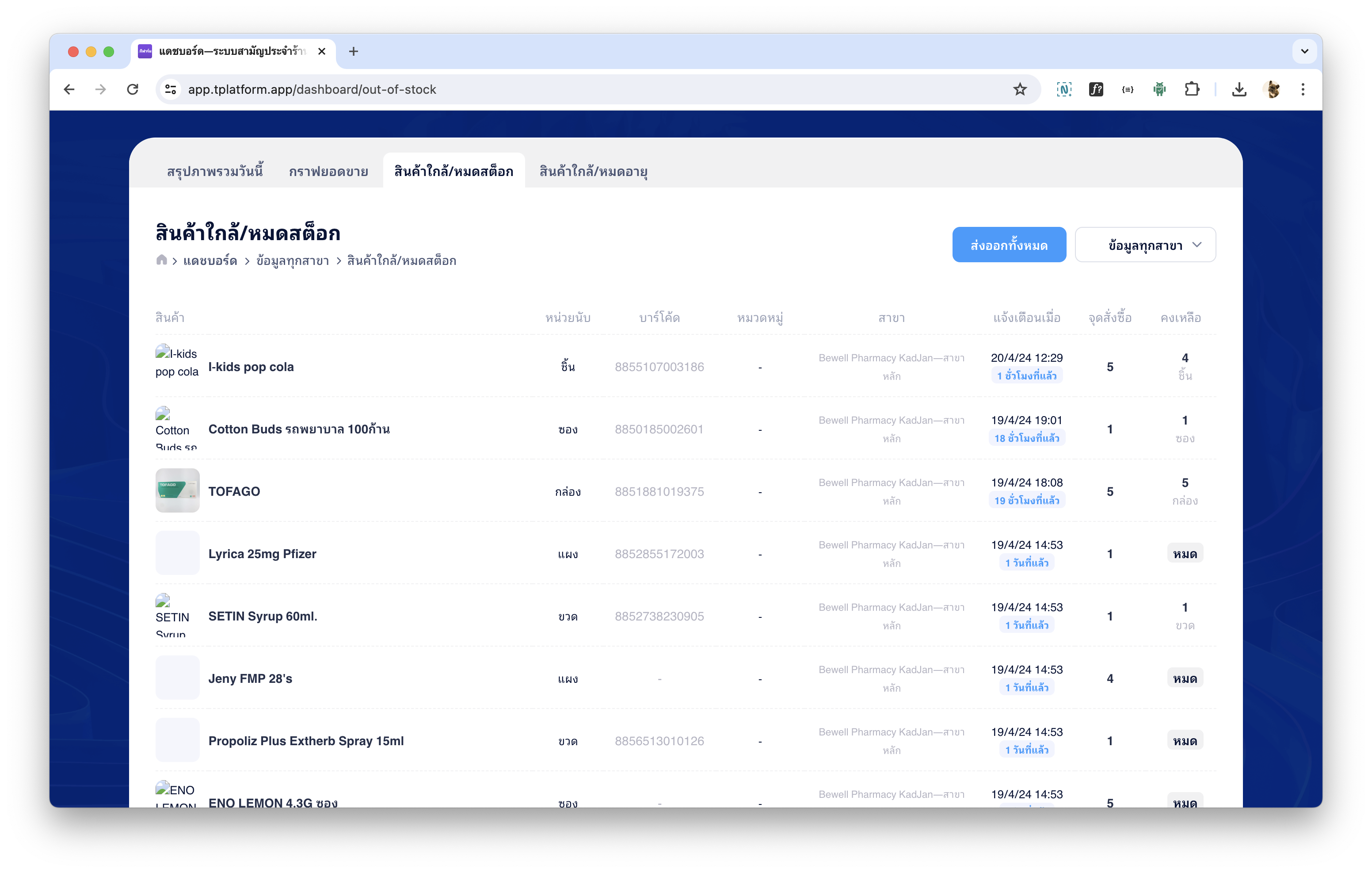
สินค้าใกล้หมดสต๊อก
ร้านค้าสามารถตรวจสอบสินค้าที่กำลังจะหมดได้อย่างสะดวก พร้อมปุ่มส่งออก (Export) เป็นไฟล์ MS-Excel เพื่อใช้ประกอบการสั่งซื้อสินค้าใหม่
สำหรับวิธีตั้งค่าสินค้าใกล้หมด สามารถดูได้ที่ (ลิงก์บทความตั้งค่าสินค้าใกล้หมด)
สินค้าใกล้หมดอายุ / หมดอายุ (Near Expiry)
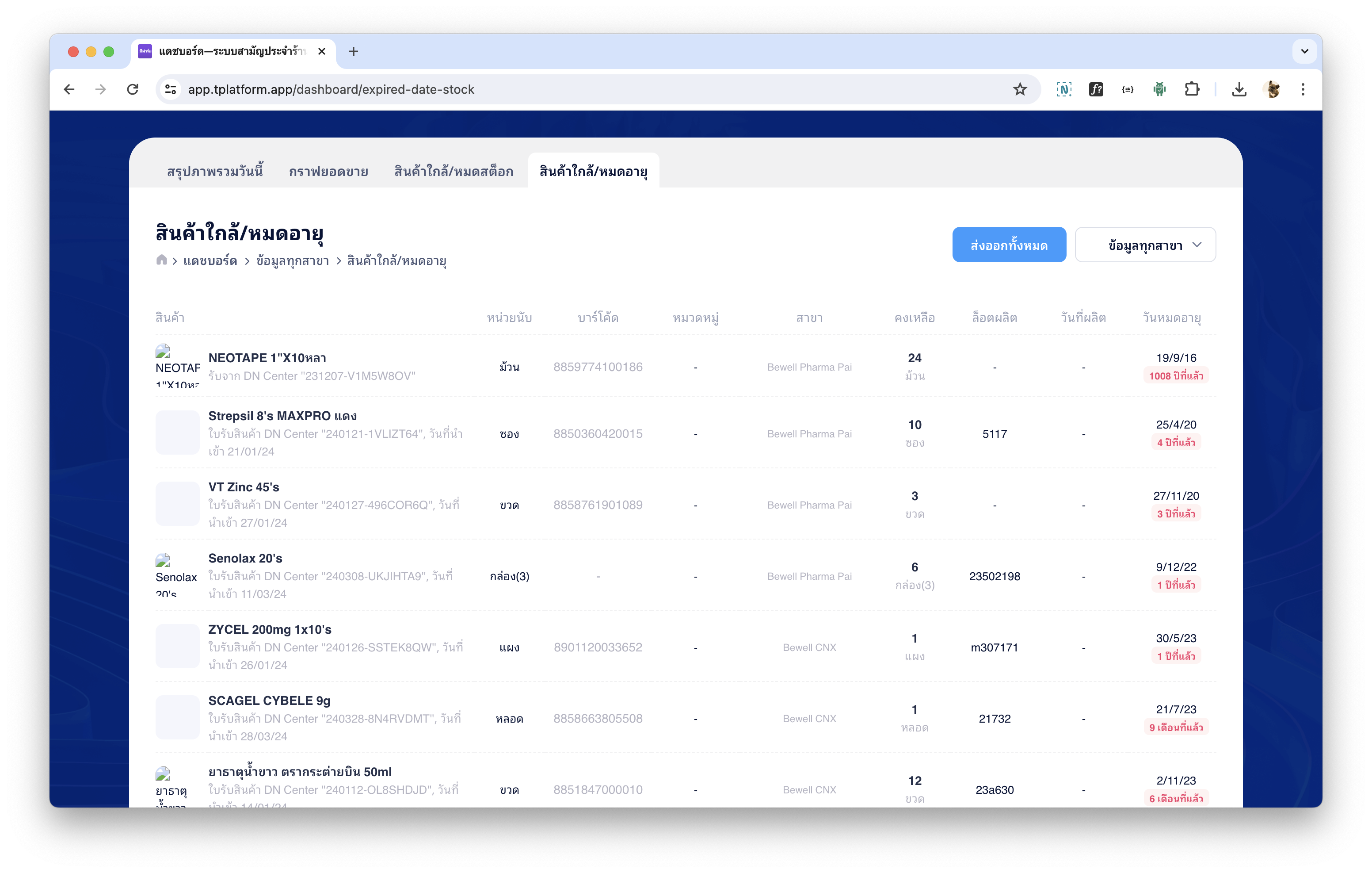
สินค้าใกล้หมดอายุ
ระบบจะแสดงสินค้าที่ใกล้หมดอายุหรือหมดอายุแล้ว โดยผู้ใช้สามารถตรวจสอบผ่านมือถือได้ทันที หรือส่งออกรายการเป็นไฟล์ Excel ได้เช่นเดียวกัน
คู่มือการตั้งค่าวันหมดอายุของสินค้าอยู่ในหัวข้อ (ลิงก์บทความตั้งค่าสินค้าใกล้หมดอายุ)
Real-Time Sales Monitoring via tPHARM Web App
If your pharmacy employs staff or you are not physically present at the store, tPHARM provides a powerful online reporting system that allows owners to check real-time sales anytime, anywhere—even while relaxing with a cup of coffee on the beach.
Simply visit https://stats.tpharm.app and enter (1) the email used with your tPHARM POS account and (2) your password. For security reasons, this website does not store login information—if you open it 10 times, you must log in 10 times.
Today Overview
The “Today Overview” dashboard includes:
- All receipts and today’s total sales, categorized by payment method (cash, credit card, PromptPay)
- Today’s profit or loss summary
- Sales trend graph from 00:00 to 23:59
- Sales breakdown by product category with top-selling category of the day
- Top 15 best-selling items (based on quantity)
- Latest sales transactions in real time
Sales Chart
The system allows selecting a custom date range to review sales history. The maximum range allowed is 31 days to ensure fast processing and accurate reporting.
Low Stock Items
You can quickly check items that are running low, and export the list as an Excel file for purchasing purposes. Setup instructions for low stock alerts are available in (linked article).
Near-Expiry Products
The system displays products that are near expiry or already expired. Users can view this information from a mobile device or export it as an Excel file. Instructions for configuring expiry alerts are available in (linked article).