การปัดเศษสตางค์ตามหลักเกณฑ์สกุลเงินไทยในระบบทีฟาร์ม tPHARM POS
ร้านค้าสามารถตั้งค่าให้ระบบทีฟาร์มปัดเศษสตางค์ตามหลักเกณฑ์ของไทยได้โดยอัตโนมัติ โดยระบบจะปรับยอดให้เหลือหน่วยสตางค์เป็น 0.25 บาท, 0.50 บาท หรือ 0.75 บาท ตามช่วงของเศษสตางค์ที่เกิดขึ้นจากการคำนวณราคาสินค้า ซึ่งมีหลักเกณฑ์ดังนี้
หลักเกณฑ์การปัดเศษสตางค์ (SATANG) ในระบบทีฟาร์ม
- 1 – 12 สตางค์ – เช่น 10.12 บาท ให้ปัดเศษลงเป็น 10.00 บาท
- 13 – 24 สตางค์ – เช่น 8.18 บาท ให้ปัดเศษขึ้นเป็น 8.25 บาท
- 25 สตางค์ – เช่น 2.25 บาท ไม่มีการปัดเศษ
- 26 – 37 สตางค์ – เช่น 12.28 บาท ให้ปัดเศษลงเป็น 12.25 บาท
- 38 – 49 สตางค์ – เช่น 6.40 บาท ให้ปัดเศษขึ้นเป็น 6.50 บาท
- 50 สตางค์ – เช่น 52.50 บาท ไม่มีการปัดเศษ
- 51 – 62 สตางค์ – เช่น 41.59 บาท ให้ปัดเศษลงเป็น 41.50 บาท
- 63 – 74 สตางค์ – เช่น 12.63 บาท ให้ปัดเศษขึ้นเป็น 12.75 บาท
- 75 สตางค์ – เช่น 66.75 บาท ไม่มีการปัดเศษ
- 76 – 87 สตางค์ – เช่น 42.77 บาท ให้ปัดเศษลงเป็น 42.75 บาท
- 88 – 99 สตางค์ – เช่น 88.88 บาท ให้ปัดเศษขึ้นเป็น 89.00 บาท
วิธีตั้งค่าการปัดเศษสตางค์ในระบบทีฟาร์ม tPHARM POS
ร้านค้าสามารถตั้งค่าการปัดเศษสตางค์ตามหลักเกณฑ์สกุลเงินไทยได้จากเมนูการตั้งค่าหลักของระบบ โดยมีขั้นตอนดังนี้
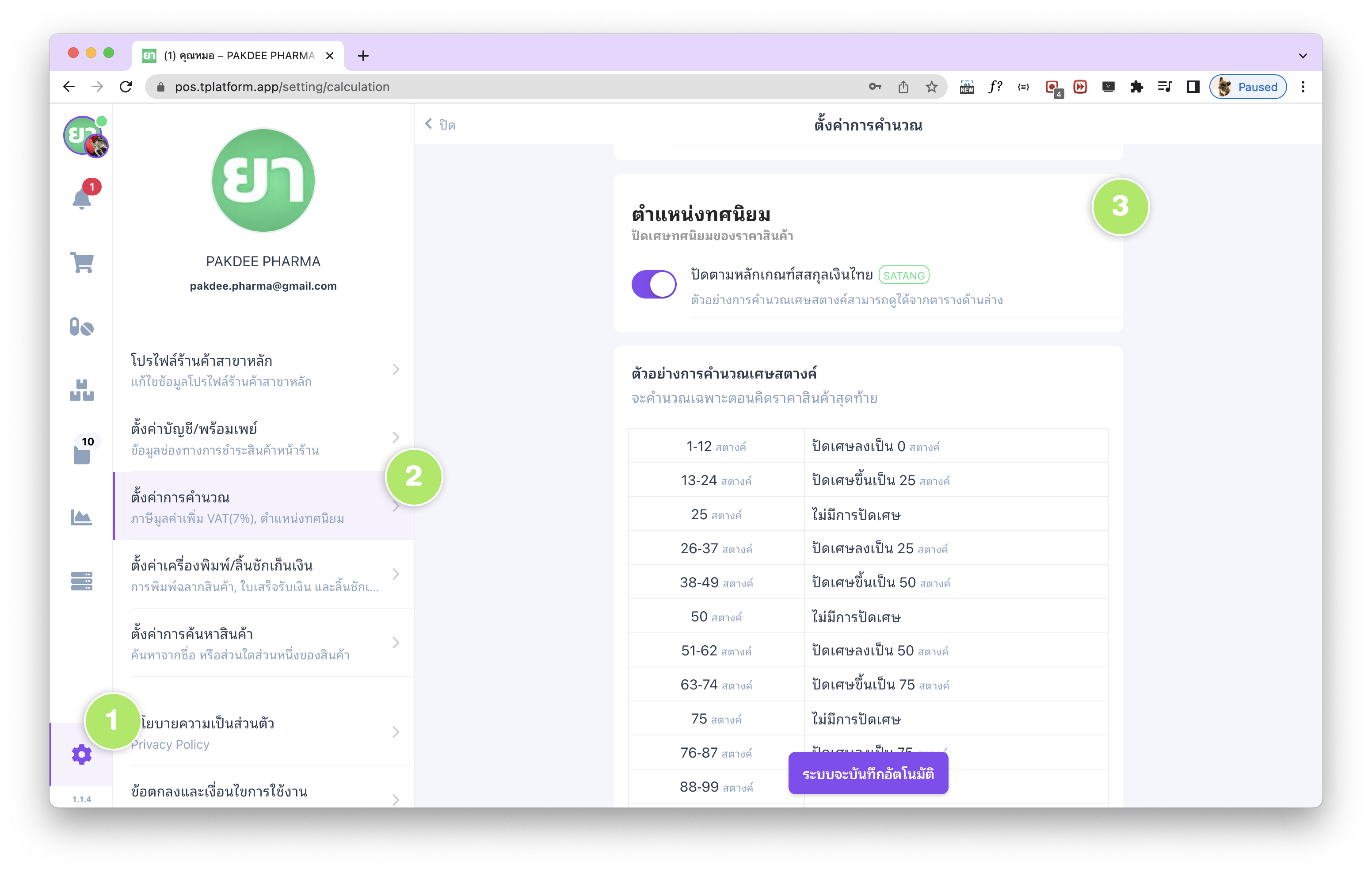
- ไปที่แถบ เมนูตั้งค่า ด้านซ้ายล่างสุดของหน้าจอ (ไอคอนรูปฟันเฟือง)
- เลือกเมนู “ตั้งค่าการคำนวณ – ภาษีมูลค่าเพิ่ม VAT 7%, ตำแหน่งทศนิยม”
- ตั้งค่าในส่วนของ “ตำแหน่งทศนิยม” และเปิดฟังก์ชัน “ปัดตามหลักเกณฑ์สกุลเงินไทย (SATANG)”
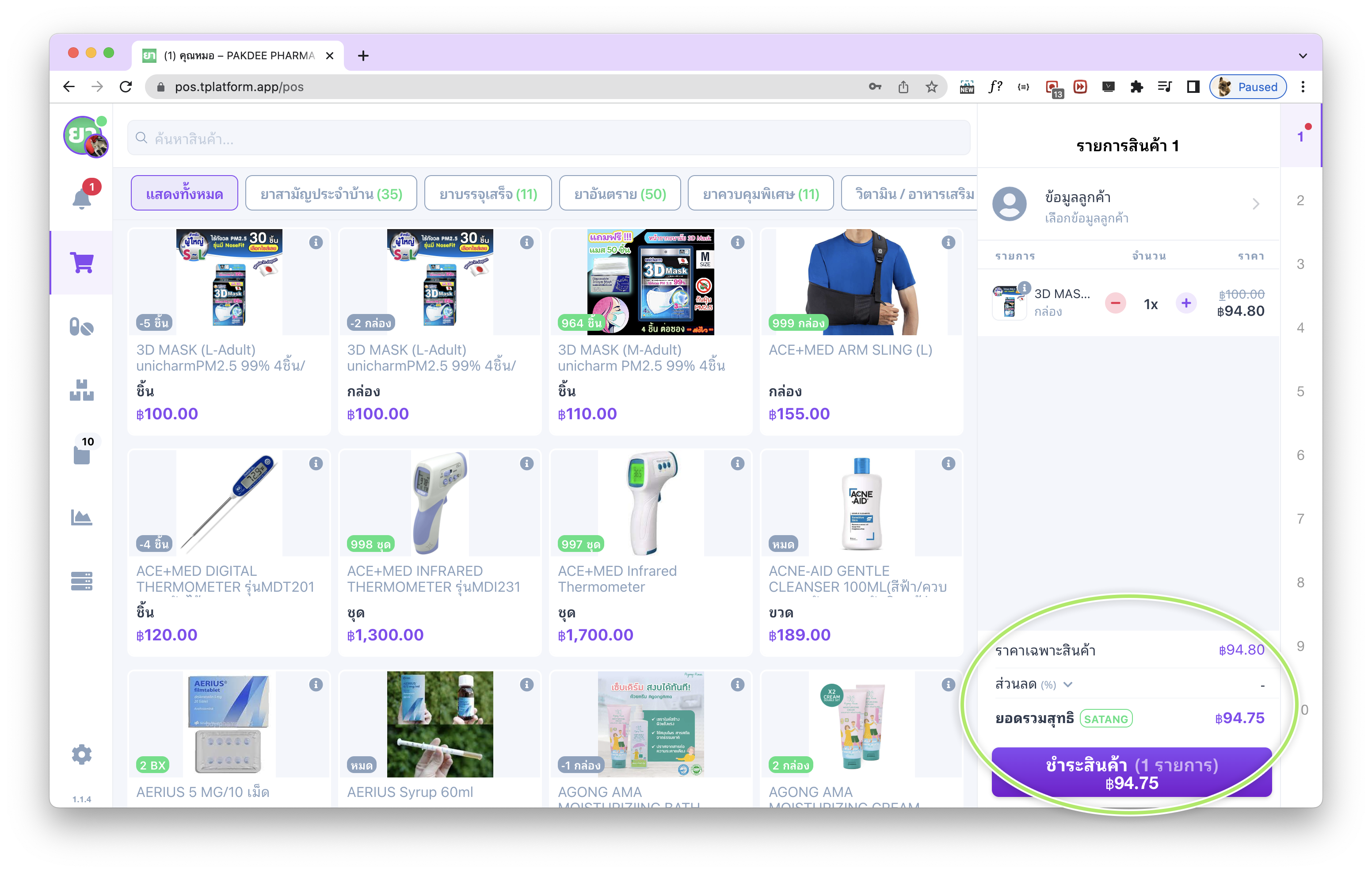
ร้านค้าสามารถเปิดหรือปิดฟังก์ชันนี้ได้ตลอดเวลา หากมีการเปิดใช้งานฟังก์ชันปัดเศษสตางค์ไว้ ในหน้าการขาย POS ระบบจะแสดง สัญลักษณ์ “SATANG” สีเขียว กำกับไว้บริเวณส่วนสรุปยอด เพื่อบอกให้ทราบว่าขณะนี้กำลังมีการใช้กติกาการปัดเศษสตางค์อยู่
Thai Satang Rounding Rules in tPHARM POS
tPHARM POS supports automatic rounding of Thai currency (baht & satang) according to common local practice. The system rounds final amounts so that the fractional part of the price ends in 0.00, 0.25, 0.50, or 0.75 baht, based on the satang range. The rounding rules are as follows:
Satang Rounding Rules Used in tPHARM
- 1 – 12 satang – e.g. 10.12 THB → rounded down to 10.00 THB
- 13 – 24 satang – e.g. 8.18 THB → rounded up to 8.25 THB
- 25 satang – e.g. 2.25 THB → no rounding
- 26 – 37 satang – e.g. 12.28 THB → rounded down to 12.25 THB
- 38 – 49 satang – e.g. 6.40 THB → rounded up to 6.50 THB
- 50 satang – e.g. 52.50 THB → no rounding
- 51 – 62 satang – e.g. 41.59 THB → rounded down to 41.50 THB
- 63 – 74 satang – e.g. 12.63 THB → rounded up to 12.75 THB
- 75 satang – e.g. 66.75 THB → no rounding
- 76 – 87 satang – e.g. 42.77 THB → rounded down to 42.75 THB
- 88 – 99 satang – e.g. 88.88 THB → rounded up to 89.00 THB
How to Enable Satang Rounding in tPHARM POS
You can enable or disable Thai satang rounding at any time from the main settings menu. To configure it:
- Open the “Settings” menu (gear icon at the bottom-left corner).
- Select “Calculation Settings – VAT 7%, Decimal Position”.
- Adjust the decimal settings and enable the option “Round according to Thai currency rules (SATANG)”.
When this feature is enabled, the POS screen will display a green “SATANG” indicator in the sales screen summary to clearly show that Thai satang rounding is currently active for all calculated totals.